Bootstrap vs Tailwind CSS: A Complete Guide

Bootstrap vs Tailwind CSS: A Complete Guide
CSS frameworks are essential for building modern, responsive web applications efficiently. Two of the most popular frameworks are Bootstrap and Tailwind CSS. This guide will help you understand both frameworks, their differences, and when to use each one.
What is Bootstrap?
Bootstrap is a component-based CSS framework that provides pre-built UI components and utilities:
- Component-Based: Ready-to-use components like buttons, cards, modals
- Grid System: Flexible 12-column grid system for layouts
- JavaScript Integration: Interactive components with built-in JavaScript
- Theme Support: Customizable themes and color schemes
How Bootstrap Works
- Include Bootstrap CSS and JS files in your project
- Use predefined classes for components like:
.btn.card.navbar - Components work out-of-the-box with minimal configuration
- Responsive behavior is built into components
<!-- Bootstrap Example -->
<div class="container">
    <div class="card">
        <div class="card-body">
            <h5 class="card-title">Card Title</h5>
            <p class="card-text">Some quick example text.</p>
            <a href="#" class="btn btn-primary">Go somewhere</a>
        </div>
    </div>
</div>
What is Tailwind CSS?
Tailwind CSS is a utility-first CSS framework that provides low-level utility classes:
- Utility-First: Small, single-purpose utility classes
- No Pre-built Components: Build components from utility classes
- Highly Customizable: Extensive configuration options
- Design System: Built-in design tokens for consistency
How Tailwind CSS Works
- Install Tailwind CSS in your project
- Configure your tailwind.config.js file
- Compose components using utility classes
- Customize design tokens (colors, spacing, fonts)
- Purge unused CSS for optimal performance
<!-- Tailwind CSS Example -->
<div class="max-w-md mx-auto">
    <div class="bg-white rounded-lg shadow-lg p-6">
        <h5 class="text-xl font-bold mb-2">Card Title</h5>
        <p class="text-gray-600 mb-4">Some quick example text.</p>
        <a
            href="#"
            class="bg-blue-500 text-white px-4 py-2
         rounded hover:bg-blue-600"
        >
            Go somewhere
        </a>
    </div>
</div>
Key Differences Between Bootstrap and Tailwind CSS
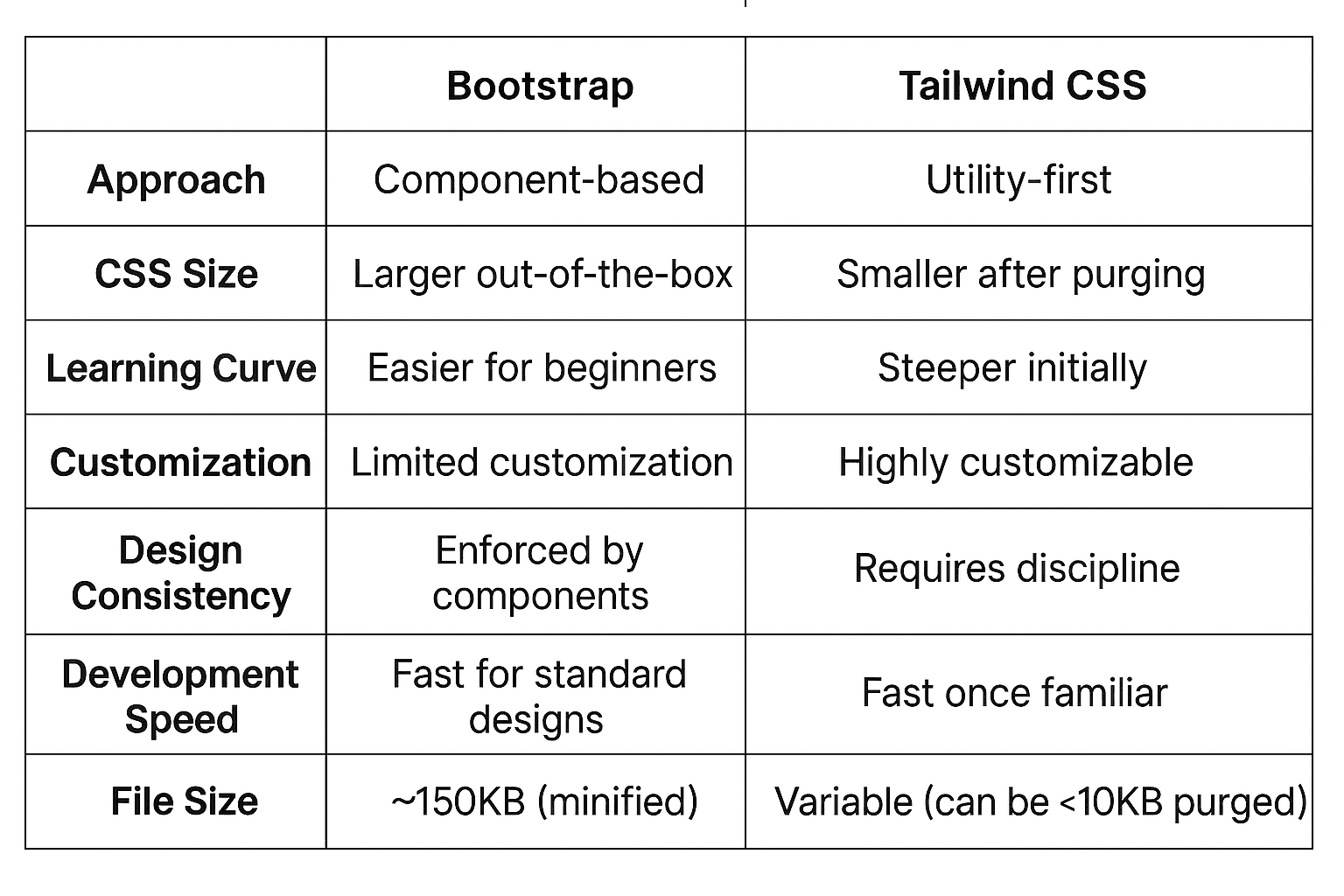
Pros and Cons
Bootstrap Advantages
- Quick Development: Pre-built components speed up development
- Beginner Friendly: Easy to learn and implement
- Consistent Design: Built-in design system ensures consistency
- Browser Compatibility: Tested across multiple browsers
- Large Community: Extensive documentation and community support
- JavaScript Components: Interactive elements included
- Responsive by Default: Mobile-first approach built-in
Bootstrap Disadvantages
- Generic Look: Websites can look similar without customization
- Larger File Size: Includes unused CSS and JavaScript
- Less Flexibility: Limited customization options
- Opinionated Design: Hard to break away from Bootstrap's design language
- jQuery Dependency: Bootstrap 4 requires jQuery (Bootstrap 5 removed this)
- Override Complexity: Difficult to override default styles cleanly
Tailwind CSS Advantages
- Highly Customizable: Complete control over design
- Utility-First: Consistent naming convention and approach
- Small Bundle Size: Only includes used utilities (with purging)
- No Design Assumptions: Doesn't impose a particular design
- Responsive Design: Built-in responsive utilities
- Developer Experience: Excellent tooling and IDE support
- Performance: Optimized CSS output
Tailwind CSS Disadvantages
- Learning Curve: Requires learning utility class names
- HTML Verbosity: Can make HTML quite verbose
- No JavaScript: No interactive components included
- Setup Complexity: Requires build process for optimal usage
- Design Inconsistency: Easy to create inconsistent designs
- Initial Development Speed: Slower until you memorize utilities
When to Use Bootstrap or Tailwind CSS

Choose Bootstrap when:
- Rapid Prototyping: Need to build something quickly
- Team with Mixed Skills: Working with designers/developers of varying experience
- Standard UI Requirements: Building conventional interfaces
- Limited Customization Needs: Default components meet requirements
- JavaScript Components: Need interactive elements out-of-the-box
- Legacy Browser Support: Need to support older browsers

Choose Tailwind CSS when:
- Custom Design Systems: Building unique, branded interfaces
- Performance Critical: File size optimization is important
- Design Control: Need pixel-perfect control over styling
- Long-term Projects: Building applications that will be maintained long-term
- Modern Workflow: Using modern build tools and processes
- Experienced Team: Team comfortable with utility-first approach
Best Practices
For Bootstrap
- Don't override classes directly; create custom classes
- Utilize the grid system effectively
- Keep Bootstrap updated for security and features
- Consider using only specific Bootstrap modules you need
For Tailwind CSS
- Configure your design system in tailwind.config.js
- Use component extraction for repeated patterns
- Implement CSS purging in production
- Create custom utility classes when needed
- Use responsive prefixes consistently
Loading Performance
Bootstrap provides consistent performance but with unused CSS. Tailwind can be much smaller when properly configured with purging, but requires build optimization.
Learn More
To deepen your understanding of CSS frameworks:
Choose the right framework based on your project requirements, team expertise, design needs, and long-term maintenance goals. Both Bootstrap and Tailwind CSS have their place in modern web development!